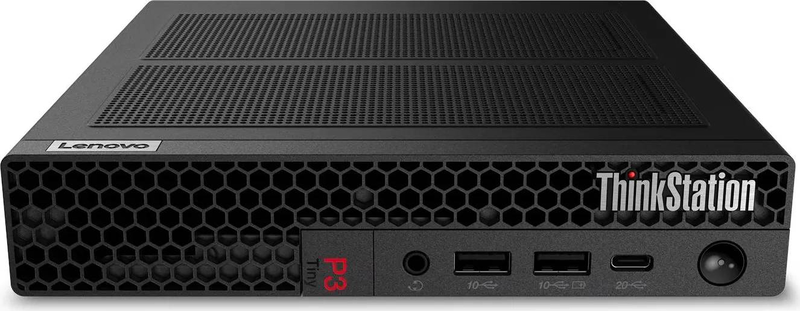
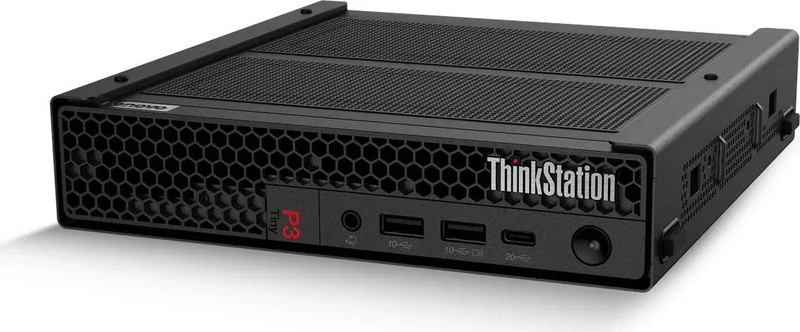
Lenovo ThinkStation P3 Tiny Gen 2 — 1L Professional Workstation
World’s smallest workstation (1L)Core Ultra 9 285 vProNVIDIA RTX A1000 8GB64GB DDR5 · 1TB · Windows 11 Pro
The Lenovo ThinkStation P3 Tiny Gen 2, part number 30K5006QGE, is the top-tier 1-litre professional workstation in the range, pairing a 24-coreIntel Core Ultra 9 285 processor with NVIDIA RTX A1000 graphics, 64GB of DDR5 memory and a 1TB NVMe SSD — built for power users, engineers and 3D professionals who demand maximum certified performance from a chassis roughly 96% smaller than a traditional tower.
The Core Ultra 9 285 is a flagship Series 2 (Arrow Lake) chip with vPro — 24 cores (8 Performance + 16 Efficiency) reaching up to 5.6 GHz with 36MB of Smart Cache. It is paired with 64GB of DDR5 and a spacious 1TB NVMe SSD. The dedicated NVIDIA RTX A1000 brings 8GB of GDDR6, 2,304 CUDA cores and Ampere RT and Tensor cores, driving professional 2D/3D, visualization and AI-accelerated workflows across up to four 5K displays via its Mini DisplayPort 1.4a ouTPUts.
Despite its desk-friendly 1L footprint, the P3 Tiny Gen 2 supports up to 128GB DDR5, PCIe Gen 5 storage, Wi-Fi 7 and optional Thunderbolt 4. This is the most powerful P3 Tiny configuration — stepping up from the Ultra 7 265 and Ultra 5 235 builds with the most cores, most memory and largest storage. Typically in stock with fast delivery across Cyprus.
Display ouTPUts — good to know
The NVIDIA RTX A1000 provides four Mini DisplayPort 1.4a ouTPUts and supports up to four displays (up to 5K each). To connect standard DisplayPort or HDMI monitors you will need Mini-DisplayPort adapters or cables (often included, but confirm your monitor connectors before setup).
Best For
✓Demanding CAD, CAM, BIM and 3D visualization workloads
✓Heavy multi-tasking — 24 cores, 64GB DDR5 and 1TB storage
✓Video editing and content creation on a small desk footprint
✓Multi-monitor setups — up to four 5K displays from the A1000
✓Secure business deployments using Intel vPro management
✓VESA / behind-monitor mounting for clean, space-saving installs
Key Features
Intel Core Ultra 9 285 with vPro
A flagship 24-core Series 2 (Arrow Lake) processor — 8 Performance cores up to 5.6 GHz plus 16 Efficiency cores and 36MB cache — with vPro for enterprise-grade manageability and security.
NVIDIA RTX A1000 8GB professional graphics
Ampere workstation GPU with 8GB GDDR6, 2,304 CUDA cores, RT and Tensor cores for accelerated 3D, rendering and AI tasks, driving up to four 5K displays.
64GB DDR5 + 1TB NVMe in a 1L chassis
A high-capacity configuration roughly 96% smaller than a traditional tower, expandable up to 128GB DDR5 with PCIe Gen 5 storage support.
Modern connectivity
Wi-Fi 7 and Bluetooth, USB-C, HDMI and DisplayPort, with optional Thunderbolt 4 and support for multiple monitors.
Technical Specifications
| Identification |
| Part Number |
30K5006QGE |
| EAN / GTIN |
0199275346682 |
| MPN |
30K5006QGE |
| Brand |
Lenovo |
| Series |
ThinkStation P3 Tiny Gen 2 |
| Processor |
| CPU |
Intel Core Ultra 9 285 (Series 2, vPro) |
| Cores / Threads |
24 cores (8 Performance + 16 Efficiency) |
| Max Frequency |
Up to 5.6 GHz |
| Cache |
36 MB Intel Smart Cache |
| Graphics |
| GPU |
NVIDIA RTX A1000 |
| Graphics Memory |
8GB GDDR6 |
| GPU Cores |
2,304 CUDA cores (Ampere, with RT & Tensor cores) |
| Display OuTPUts |
4× Mini DisplayPort 1.4a (up to four 5K displays) |
| Memory & Storage |
| Memory |
64GB DDR5 (expandable up to 128GB, dual-channel) |
| Storage |
1TB PCIe NVMe SSD (TCG Opal); supports PCIe Gen 5 |
| Connectivity & General |
| Wireless |
Wi-Fi 7 + Bluetooth |
| Ports |
USB-C, USB-A, HDMI, DisplayPort; optional Thunderbolt 4 |
| Form Factor |
1L Tiny (approx. 96% smaller than a standard tower) |
| Operating System |
Windows 11 Pro |
| Colour |
Black |
Frequently Asked Questions
Is the ThinkStation P3 Tiny Gen 2 powerful enough for demanding 3D and rendering?
This is the top P3 Tiny configuration: a 24-core Core Ultra 9 285, 64GB DDR5, 1TB NVMe and a dedicated NVIDIA RTX A1000 8GB GPU. It handles heavy CAD, 3D visualization, video editing and AI-accelerated workflows. For very large-scene GPU rendering or simulation, a P3 Tower with a higher-tier RTX card is stronger still.
How many monitors can this P3 Tiny Gen 2 support?
The NVIDIA RTX A1000 provides four Mini DisplayPort 1.4a ouTPUts and supports up to four displays at resolutions up to 5K each. You may need Mini-DisplayPort adapters to connect standard DisplayPort or HDMI monitors.
What is the difference between this build and the Ultra 7 265 and Ultra 5 235 versions?
This is the flagship: a 24-core Ultra 9 285 with 64GB DDR5 and 1TB storage. The Ultra 7 265 build has 20 cores, 48GB and 512GB; the Ultra 5 235 build has 14 cores, 16GB and an RTX A400. Choose the Ultra 9 for the most cores, memory and storage in the 1L range.
Can I upgrade the memory and storage later?
Yes. It ships with 64GB DDR5 and a 1TB NVMe SSD, and the P3 Tiny Gen 2 supports up to 128GB DDR5 dual-channel memory and PCIe Gen 5 storage, leaving headroom to expand further.
Singular Expert Insight
This is the P3 Tiny Gen 2 to choose when you want the maximum CPU and memory the 1L platform offers. The 24-core Ultra 9 285 with 64GB DDR5 makes light work of heavy multi-tasking, simulation prep and large assemblies, while the RTX A1000 8GB covers professional 3D, multi-5K-display and AI-accelerated work. Note the GPU is shared with the Ultra 7 build — if your bottleneck is GPU rendering rather than CPU, a P3 Tower with an RTX 2000/4000-class card is the better upgrade path. But for CPU-heavy professional work in the smallest possible footprint, this is the flagship pick.
Buyer’s Guide
Buy it if
You want the most powerful 1L workstation — 24-core Ultra 9 285, 64GB DDR5, 1TB NVMe and RTX A1000 8GB — for demanding CPU-heavy CAD/3D/AI work with vPro security.
Skip it if
Your bottleneck is GPU rendering or simulation needing an RTX 2000/4000-class card — the A1000 and 1L thermals limit you; a P3 Tower is the better path.
Also consider
The Ultra 7 265 / 48GB P3 Tiny for a lower-cost build with the same GPU, or a P3 Tower for more expansion and a stronger graphics card.