🔥Selling fast!

Startech dk31c3mncrue USB-c docking station triple monitor 4k30 dual 4k60 HDMI displayport 7-port USB gbe 60w pd

€299.53
Only 2 left!
or
Pay in 3, 6 or 9 interest-free monthly installments and 0 service fees with Fleksy image
Select Color: Grey
Low stock
[{"value":"1","url":"/on/demandware.store/Sites-Jinius-Site/en_GB/Product-OfferAvailability?p11Quantity=2&pid=8211484&productId=f21aa2fa-dfac-40bc-96b8-5778560a476d&quantity=1"},{"value":"2","url":"/on/demandware.store/Sites-Jinius-Site/en_GB/Product-OfferAvailability?p11Quantity=2&pid=8211484&productId=f21aa2fa-dfac-40bc-96b8-5778560a476d&quantity=2"}]
+
[{"value":"1","url":"/on/demandware.store/Sites-Jinius-Site/en_GB/Product-OfferAvailability?p11Quantity=2&pid=8211484&productId=f21aa2fa-dfac-40bc-96b8-5778560a476d&quantity=1"},{"value":"2","url":"/on/demandware.store/Sites-Jinius-Site/en_GB/Product-OfferAvailability?p11Quantity=2&pid=8211484&productId=f21aa2fa-dfac-40bc-96b8-5778560a476d&quantity=2"}]
+
598
Points earned
You can earn Antamivi points every time you make a payment using your Bank of Cyprus cards.
The number of Antamivi points and the corresponding amount of money displayed are indicative and may vary from time to time. Want to know more? Check out our FAQs here.
If you are an eligible member of the Bank of Cyprus loyalty scheme Pronomia, you will receive additional Antamivi points based on your assigned tier.
Delivery options
Pick-up points / Lockers
Est. delivery: 03 Aug - 04 Aug
Free
Delivery to your door
FREE shipping on orders over €85.00 from Singular Computers Systems LTD
Est. delivery: 03 Aug - 05 Aug
Free

Description

Item No. f21aa2fa-dfac-40bc-96b8-5778560a476d
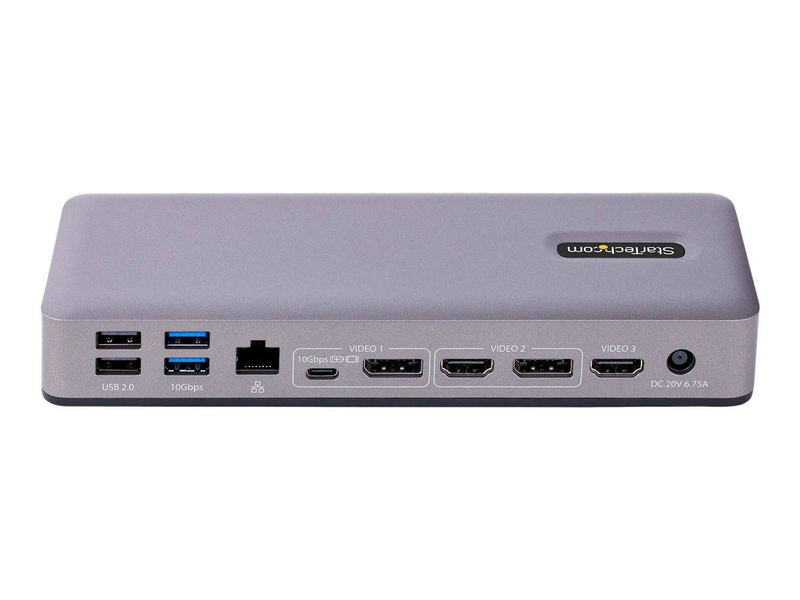
StarTech USB-C Multi-Monitor Docking Station A native USB-C DP Alt Mode dock that drives triple 4K30 or dual 4K60 displays via HDMI, DisplayPort and USB-C, with a 7-port USB hub, Gigabit LAN and 60W charging over one cable. Triple Monitor3x 4K30 / 2x 4K607-Port USB Hub60W Charging The StarTech DK31C3MNCRUE (part number DK31C3MNCRUE) is a USB-C multi-monitor docking station that expands a single USB-C port into a triple-display workspace using HDMI, DisplayPort and USB-C DP Alt Mode video output

Attributes

Details

StarTech USB-C Multi-Monitor Docking Station

A native USB-C DP Alt Mode dock that drives triple 4K30 or dual 4K60 displays via HDMI, DisplayPort and USB-C, with a 7-port USB hub, Gigabit LAN and 60W charging over one cable.
Triple Monitor3x 4K30 / 2x 4K607-Port USB Hub60W Charging

The StarTech DK31C3MNCRUE (part number DK31C3MNCRUE) is a USB-C multi-monitor docking station that expands a single USB-C port into a triple-display workspace using HDMI, DisplayPort and USB-C DP Alt Mode video ouTPUts. It adds a 7-port USB hub, Gigabit Ethernet, 3.5mm audio and 60W laptop charging, and is Chromebook certified and TAA compliant for business and public-sector use. Typically in stock with fast delivery across Cyprus.

Compatibility note
This dock uses native DisplayPort Alt Mode with Multi-Stream Transport (MST), so triple-display ouTPUt requires a Windows or Chrome OS host whose USB-C (or Thunderbolt 3/4) port supports DP Alt Mode and MST. On macOS, MST is not supported, so the dock mirrors a single external display rather than extending across three. Charging requires the host to accept up to 60W USB-C PD.

Best For

Windows and Chromebook triple-monitor setups
Native, uncompressed DisplayPort video
Business and public-sector desks (TAA compliant)
Single-cable connect with 60W charging
Wired Gigabit networking and 7-port USB
Mixing HDMI, DisplayPort and USB-C monitors

Key Features

 
Triple-monitor video
HDMI, DisplayPort and USB-C DP Alt Mode ouTPUts drive up to three 4K displays at 30Hz or two at 60Hz on Windows and Chrome OS, using native MST for uncompressed video.
 
7-port USB hub
A Generous 7-port USB hub connects keyboards, mice, storage, webcams and more, keeping your desk cable-free through the single dock connection.
 
60W charging & Gigabit LAN
Provides up to 60W of USB Power Delivery to keep your laptop charged, plus a Gigabit Ethernet port for reliable wired networking.
 
Business-ready & certified
Chromebook certified and TAA compliant, with 3.5mm audio, making it well-suited to corporate and public-sector deployments.

Technical Specifications

Identification
Part Number DK31C3MNCRUE
EAN / GTIN 0065030898133
MPN DK31C3MNCRUE
Brand StarTech.com
Connection & Video
Host interface USB-C DisplayPort Alt Mode + MST (USB-C / Thunderbolt 3/4)
Video ouTPUts HDMI + DisplayPort + USB-C (DP Alt Mode)
Max resolution (Windows/Chrome) Triple 4K at 30Hz or dual 4K at 60Hz
macOS displays Single external display only (MST not supported)
Ports
USB hub 7-port USB hub (USB-A + USB-C)
Networking 1x RJ-45 — Gigabit Ethernet
Audio 1x 3.5mm audio jack
Power & Compliance
Power delivery Up to 60W to host laptop
Certifications Chromebook certified, TAA compliant
Colour Grey / Black
Support
Compatibility Windows, Chrome OS (triple display); macOS single display
Warranty 1-Year Warranty (Singular)

Frequently Asked Questions

Does the StarTech DK31C3MNCRUE work with my laptop?
It works with laptops whose USB-C or Thunderbolt 3/4 port supports DisplayPort Alt Mode, on Windows and Chrome OS. These can extend across the dock’s HDMI, DisplayPort and USB-C video ouTPUts.
Can I run three extended monitors on a Mac?
No. This dock uses DisplayPort MST, which macOS does not support, so on a Mac it mirrors to a single external display. For extended multi-monitor use on macOS, choose a DisplayLink dock instead.
How many monitors and at what resolution?
Up to three 4K displays at 30Hz, or two 4K displays at 60Hz, on Windows and Chrome OS through native MST.
Will it charge my laptop?
Yes. It delivers up to 60W of USB Power Delivery to the host, enough to charge and run most ultrabooks and business laptops while docked.

Singular Expert Insight

Why choose the DK31C3MNCRUE
For Windows or Chromebook fleets that need native triple-monitor ouTPUt plus a large USB hub, this TAA-compliant StarTech dock is a dependable, business-ready choice. Pair it with screens from our PC monitors range, and compare it with other docking stations if you use Macs or need dual 4K60 across all screens. Mac-based teams should choose a DisplayLink dock for extended multi-monitor support.

Buyer’s Guide

Buy it if
You run Windows or Chromebook laptops and want native triple-monitor ouTPUt, a 7-port hub, GbE and 60W charging.
Skip it if
You use a MacBook and need extended multi-monitor, or you need all three screens at 4K60.
Also consider
A DisplayLink dock for universal Mac/Windows triple display, or a Thunderbolt dock for higher bandwidth.