Startech USB3dockh2dp USB 3.0 triple monitor docking station 2x displayport HDMI 4k displaylink 5x USB-a gbe black
🔥Πωλείται γρήγορα!
Startech USB3dockh2dp USB 3.0 triple monitor docking station 2x displayport HDMI 4k displaylink 5x USB-a gbe black
€ 197.50
Aπομένουν μόνο 2!
ή
Πλήρωσε σε 3, 6 ή 9 άτοκες δόσεις με 0 χρεώσεις υπηρεσίας χρησιμοποιώντας το
Επιλογή Χρώμα: Black
Χαμηλό απόθεμα
[{"value":"1","url":"/on/demandware.store/Sites-Jinius-Site/el_CY/Product-OfferAvailability?p11Quantity=2&pid=8211260&productId=22298b47-3362-483a-87aa-e914cd2a220b&quantity=1"},{"value":"2","url":"/on/demandware.store/Sites-Jinius-Site/el_CY/Product-OfferAvailability?p11Quantity=2&pid=8211260&productId=22298b47-3362-483a-87aa-e914cd2a220b&quantity=2"}]
–+
[{"value":"1","url":"/on/demandware.store/Sites-Jinius-Site/el_CY/Product-OfferAvailability?p11Quantity=2&pid=8211260&productId=22298b47-3362-483a-87aa-e914cd2a220b&quantity=1"},{"value":"2","url":"/on/demandware.store/Sites-Jinius-Site/el_CY/Product-OfferAvailability?p11Quantity=2&pid=8211260&productId=22298b47-3362-483a-87aa-e914cd2a220b&quantity=2"}]
–+
394
Points earned
Περιγραφή
Αριθμός προϊόντος:
22298b47-3362-483a-87aa-e914cd2a220b
StarTech USB3DOCKH2DP — USB 3.0 Triple Monitor Docking Station (2x DP + HDMI)
Triple Display (2x DP + HDMI)4K 30Hz (DisplayLink)Triple display on Mac5x USB-A + GbE
The StarTech USB3DOCKH2DP (part number USB3DOCKH2DP) is a USB 3.0 triple monitor docking station that adds two DisplayPort and one HDMI output, five USB-A ports, Gigabit Ethernet and audio to a laptop over a single USB cable — a dependable choice for triple-display office setups on both Windows and macOS. Because it uses DisplayLink,
Χαρακτηριστικά
Λεπτομέρειες
StarTech USB3DOCKH2DP — USB 3.0 Triple Monitor Docking Station (2x DP + HDMI)
Triple Display (2x DP + HDMI)4K 30Hz (DisplayLink)Triple display on Mac5x USB-A + GbE
The StarTech USB3DOCKH2DP (part number USB3DOCKH2DP) is a USB 3.0 triple monitor docking station that adds two DisplayPort and one HDMI ouTPUt, five USB-A ports, Gigabit Ethernet and audio to a laptop over a single USB cable — a dependable choice for triple-display office setups on both Windows and macOS. Because it uses DisplayLink, it delivers Genuine triple-monitor ouTPUt even on MacBooks, which standard USB-C docks cannot do. It is a data-and-video dock and does not charge the laptop. Typically in stock with fast delivery across Cyprus.
Compatibility & setup
Video runs over DisplayLink (DL-5911/DL-5915 chipsets), so a free one-time DisplayLink driver install is required on Windows or macOS. It supports up to three displays — the two DisplayPort ouTPUts up to 4K 3840x2160 at 30Hz and the HDMI up to 2560x1440 — including full triple-monitor ouTPUt on Macs, where standard USB-C MST docks cannot. It connects to a USB 3.0 Type-A port (USB-C laptops via a simple adapter). Note this is a legacy USB-A dock with no USB-C Power Delivery: it does not charge the laptop and runs from its own included power adapter.
Best For
✓Triple-monitor office and trading desks
✓Mac users needing three displays (DisplayLink)
✓Windows and macOS mixed environments
✓Reusing DisplayPort and HDMI monitors
✓Laptops that charge from their own adapters
✓Wired Gigabit networking and USB peripherals
Key Features
Triple Display on Any Laptop
DisplayLink drives three monitors — two DisplayPort and one HDMI — on Windows and macOS, including Macs where native USB-C manages only one.
Five USB 3.0 + Gigabit
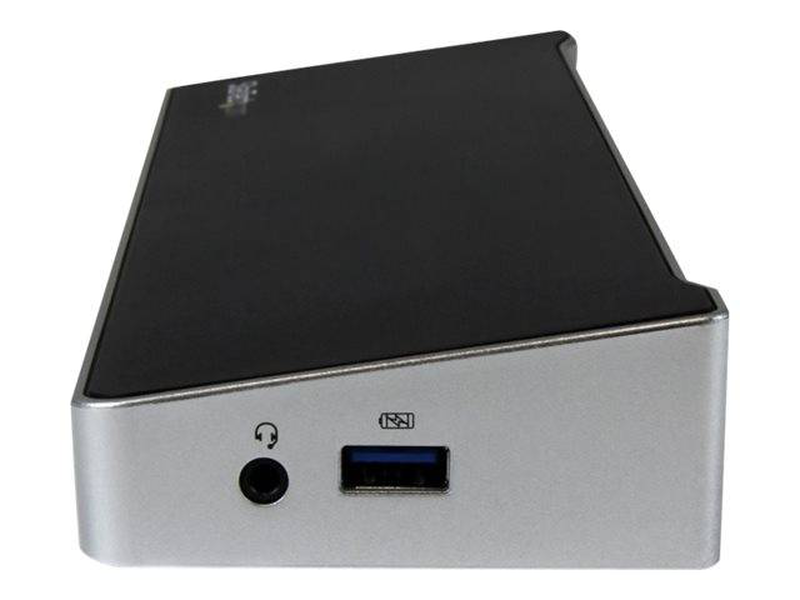
Five USB-A 5GBps ports (one fast-charge), Gigabit Ethernet and 3.5mm headset, audio and mic jacks connect all your peripherals.
Broad Laptop Support
DisplayLink certification means it works across almost any laptop brand over USB 3.0, including Macs, with the free driver installed.
Technical Specifications
| Identification | |
| Part Number | USB3DOCKH2DP |
| EAN / GTIN | 0065030860918 |
| MPN | USB3DOCKH2DP |
| Brand | StarTech.com |
| Video OuTPUt | |
| Display Ports | 2 x DisplayPort + 1 x HDMI |
| Video Technology | DisplayLink DL-5911/DL-5915 — universal driver-based video (driver install required) |
| Max Resolution | DisplayPort up to 4K 3840x2160 @ 30Hz; HDMI up to 2560x1440 — up to 3 displays |
| OS Support | Windows, macOS (triple display), Chrome OS, Ubuntu |
| Data Ports | |
| USB-A | 5 x USB-A 3.0 (5GBps) — 1 fast-charge (BC 1.2) |
| Audio | 3.5mm headset jack + separate audio and microphone |
| Network | |
| Ethernet | Gigabit Ethernet (RJ45, 1GBps) |
| Power & Host | |
| Host Connection | USB 3.0 Type-B upstream (1m cable) — USB-C hosts via adapter |
| Power Delivery | None — dock does not charge the laptop (own power adapter) |
| Physical | |
| Dimensions | 270 x 82 x 34 mm |
| Weight | 376 g |
| Colour | Black / Silver |
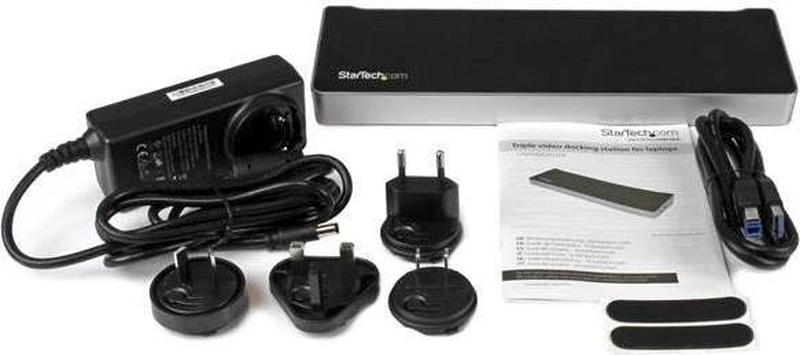
| In the Box | Dock, USB cable, power adapter, manual |
| Warranty | 1-Year Warranty (Singular) |
Frequently Asked Questions
Singular Expert Insight
A solid triple-monitor dock for office work — DisplayLink means it runs three screens on Windows and, notably, on Macs, over ordinary USB 3.0. It is a legacy USB-A design, so displays top out at 4K 30Hz and it does not charge the laptop; if you need 4K 60Hz or USB-C charging, choose a modern USB-C DisplayLink dock such as the Targus DOCK310. Browse the full laptop docking stations range, and pair it with our PC monitors.
Buyer’s Guide
Buy it if
You want triple monitors on Windows or Mac reusing DP/HDMI screens, with GbE and five USB ports, over standard USB 3.0.
Skip it if
You need 4K 60Hz or want the dock to charge your laptop — displays are 4K 30Hz and there is no Power Delivery.
Also consider
A USB-C DisplayLink dock (e.g. Targus DOCK310) for 4K 60Hz displays and 65W laptop charging.